
6.7.1 Geometry
To create the geometry model,follow these steps:
Project properties
 Start a new project
 Enter an appropriate title for the project
 Define the limits for the soil contour as Xmin=0,Xmax=80,Ymin=0 and Ymax=50.
Definition of soil stratigraphy
In order to define the soil layers,a borehole needs to be added and material properties must be assigned.As all soil layers are horizontal,only a single borehole is needed.
 Create a borehole at(0,0).The Modify soil layers window pops up.
 Add 4 layers with bottom levels at-1,9.5,-11,-20.Set the Head in the borehole
column to-4 m.
 Open the Material sets window.
 Create a new data set under soil and interfaces set type.
 Identify the new data set as“Fill”.
 From the Material mode/drop⁃down menu,select Hardening Soil model.In contrast with the Mohr⁃Coulomb model,the Hardening Soil model takes into account the difference in stiffness between virgin⁃loading and unloading⁃reloading.For a detailed description of the Hardening Soil model,see Chapter 7.
 Define the saturated and unsaturated unit weights according to Table 6.2.
 In the Parameters tabsheet,enter values for
  ,E
,E ,E
,E ,m,
,m, ,
, ,ψand
,ψand  according to Table 6.2.Note that Poisson's ratio is an advanced parameter.
 As no consolidation will be considered in this exercise,the permeability of the will not
influence the results.Therefore,the default values can be kept in the parameters tabsheet.
Table 6.2 Material properties for the soil layers
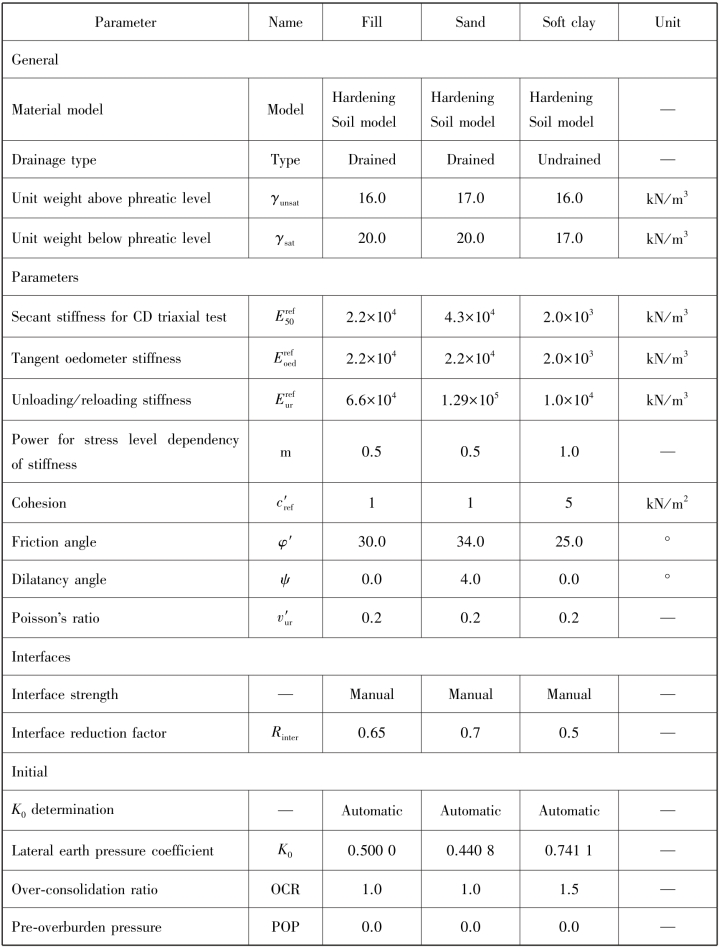
In the Interfaces tabsheet,select Manual in the Strength box and enter a value of 0.65 for the parameter Rinter.This parameter relates the strength of the interfaces to the strength of the soil,according to the equations:
ci=Rinter csoil and tanφi=Rinter tanφi≤tanφsoil
Hence,using the entered Rinter⁃value gives a reduced interface friction and interface cohesion(adhesion)compared to the friction angle and the cohesion in the adjacent soil.When the Rigid option is selected in the Strength drop⁃down,the interface has the same strength properties as the soil(Rinter=1.0).Note that a value of Rinter<1.0,reduces the strength as well as the stiffness of the interface.
In the Initial tabsheet,define the OCR⁃value according to Table 6.2.
Click OK to close the window.
In the same way,define the material properties of the“Sand”and“Soft”Clay materials as given by Table 6.2.The Tension cut⁃off option is activated by default at a value of 0 kN/m.This option is found in the Advanced options on the Parameters tabsheet of the soil window.Here the Tension cut⁃off value can be changed or the option can be deactivated entirely.
After closing the Material sets window,click the OK button to close the Modify soil layers window.
In the Soil mode right click on the upper soil layer.In the appearing right hand mouse button menu,select the Fill option in the Set material menu.
In the same way,assign the Soft Clay material to the soil layer between y=-9.5 m and y=-11.0 m.
Assign the Sand material to the remaining two soil layers.
Proceed to the Structures mode to define the structural elements.